01 / 30 秒回忆
A serial assistant talks to a local USB-to-UART device using a selected baud rate, data bits, parity, and stop bits. Web Serial keeps permission, terminal display, and monitoring inside the current browser page.
 51shangTOPSearch
SERIAL / 独立工作台
在支持 Web Serial 的桌面浏览器中连接本地串口,完成文本 / HEX 收发、指令定时发送和数据监测。
连接按钮只会在用户主动点击后请求串口权限。
终端
选择串口并打开连接后,接收数据会显示在这里。
文件
选择本地文件后可开始;文件按分块读取,不写入二进制终端日志。
在数值监测卡片中打开“加入曲线”,这里只保留最近 60 秒的监测样本。
| 监测项 | 当前 | 最小 | 最大 | 样本 |
|---|
解析器只读取接收字节,不改变原始终端和发送逻辑。解析失败的字节仍会保留并标记原因。
配置起始字节后,解析器会先寻找起始标记,再按固定总长度取帧。
长度字段偏移相对于帧起始位置;起始字节沿用上方配置。
解析关闭;原始终端仍会保留全部接收数据。
解析关闭;不会生成帧记录。
知识回忆
概念、帧格式和工程边界。
01 / 30 秒回忆
A serial assistant talks to a local USB-to-UART device using a selected baud rate, data bits, parity, and stop bits. Web Serial keeps permission, terminal display, and monitoring inside the current browser page.
02 / 核心关系
A common asynchronous frame is 1 start bit + 7/8 data bits + optional parity + 1/2 stop bits. Text uses UTF-8; HEX displays one byte per pair of hexadecimal digits.
03 / 使用判断
Confirm the device voltage level and frame format before choosing link settings. Use text mode for line-based logs and HEX mode for binary protocols.
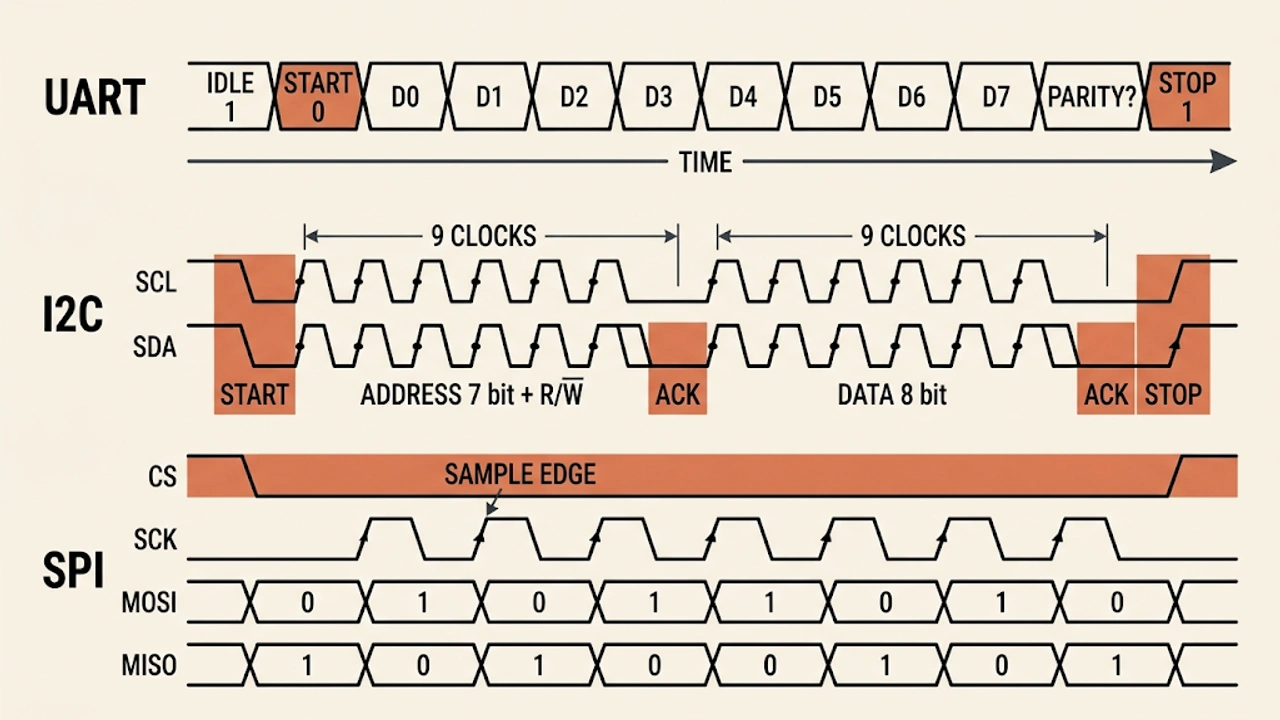
Do not connect an incompatible voltage level, or change only the baud rate while ignoring data bits, parity, and stop bits. A missing HEX nibble changes the whole frame.
Web Serial requires HTTPS or localhost and a desktop Chromium browser. This page never uploads serial bytes and does not replace a protocol analyzer; verify grounding, cable length, clock error, flow control, and frame timeouts in the real system.
关系
边界