51shangTOP

Navigation

TOOLS / Digital

Fixed-Point Analyzer

A browser-local Fixed-Point Analyzer for electronic-information study and early engineering checks.

Browser-local calculationQ-format encoding

Quick guide

How to use “Fixed-Point Analyzer”

3-step guide +
  1. Enter parametersProvide values, units, or local files using the field guidance.
  2. CalculateClick Calculate to see key values, formulas, units, and model notes.
  3. Check limitsReview assumptions and limits before using the estimate in a real design.

Input

Parameters

A
Q format
Enter a valid signed. Check the result notes for model assumptions and limits.
bit
Enter a valid integer bits in bit. Check the result notes for model assumptions and limits.
bit
Enter a valid fractional bits in bit. Check the result notes for model assumptions and limits.
Quantization input
Enter a valid value. Check the result notes for model assumptions and limits.
Enter a valid overflow mode. Check the result notes for model assumptions and limits.

Output

Calculation result

B
Loading this tool…
Results will appear here.

Local actions

Calculated in this browser; parameters are not uploaded.

More actions

Knowledge recall

Concept notes

NOTE

Concepts, relationships, and engineering limits.

01 / 30-second recall

Fixed-Point Analyzer uses the Q-format encoding model to connect the entered parameters with a practical engineering quantity. The result is a local estimate, not a measurement.

02 / Core relationship

Use the displayed Q-format encoding relationship with consistent SI units. Keep the formula, unit conversion, and sign convention together when checking the result.

03 / When to use

Enter the values you actually know, calculate, and then compare the result with the expected range, component limits, and the operating conditions of your design.
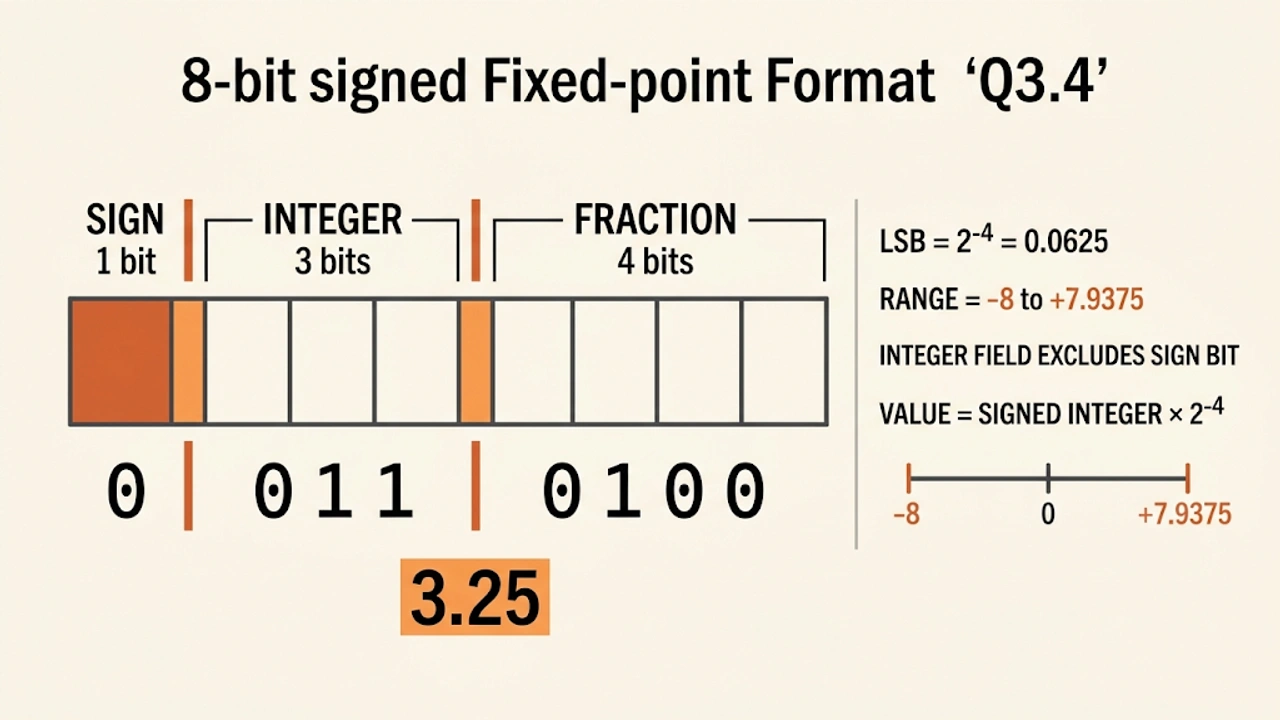
Fixed-Point Analyzer teaching diagram
Teaching diagram for the Q-format encoding model used by this tool.
Common pitfalls

Do not treat a nominal value or a first-order model as proof that a real circuit will meet its tolerance, stability, thermal, timing, or signal-integrity requirements.

Engineering note

Use this result for learning and early planning. Confirm the final design with the relevant datasheet, simulation, measurement, layout review, and worst-case conditions.

FormulaCalculation basis
  • Use the displayed Q-format encoding relationship with consistent SI units. Keep the formula, unit conversion, and sign convention together when checking the result.
LimitsAssumptions & limits
  • Use this result for learning and early planning. Confirm the final design with the relevant datasheet, simulation, measurement, layout review, and worst-case conditions.